WebOptimizer - a Bundler and Minifier for ASP.NET Core
I'll try it out on a default ASP.NET Core 2.0 app.
First, assuming I've installed http://dot.net I'll run
C:\Users\scott\Desktop> cd squishywebC:\Users\scott\Desktop\squishyweb> dotnet new mvcThe template "ASP.NET Core Web App (Model-View-Controller)" was created successfully.This template contains technologies from parties other than Microsoft, see https://aka.ms/template-3pn for details.SNIPRestore succeeded.
Then I'll add a reference to the WebOptimizer package. Be sure to check the versioning and pick the one you want, or use the latest.
C:\Users\scott\Desktop\squishyweb> dotnet add package LigerShark.WebOptimizer.Core --version 1.0.178-beta
Add the service in ConfigureServices and add it (I'll do it conditionally, only when in Production) in Configure. Notice I had to put it before UseStaticFiles() because I want it to get the first chance at those requests.
public void ConfigureServices(IServiceCollection services){ services.AddMvc(); services.AddWebOptimizer();}// This method gets called by the runtime. Use this method to configure the HTTP request pipeline.public void Configure(IApplicationBuilder app, IHostingEnvironment env){ if (env.IsDevelopment()) { app.UseDeveloperExceptionPage(); } else { app.UseWebOptimizer(); app.UseExceptionHandler("/Home/Error"); } app.UseStaticFiles(); app.UseMvc(routes => { routes.MapRoute( name: "default", template: "{controller=Home}/{action=Index}/{id?}"); });}
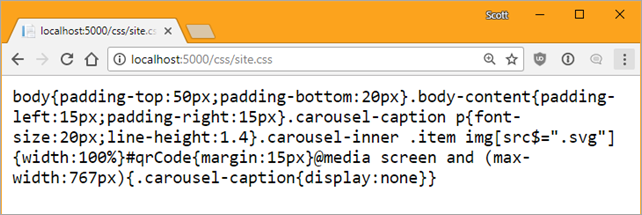
After running "dotnet run" I'll request site.css as an example and see it's automatically minimized:
You can control the pipeline with globbing like this:
public void ConfigureServices(IServiceCollection services){ services.AddMvc(); services.AddWebOptimizer(pipeline => { pipeline.MinifyJsFiles("js/a.js", "js/b.js", "js/c.js"); });}
If I wanted to combine some files into an output "file" that'll be held/cached only in memory, I can do that also. To be clear, it'll never touch the disk, it's just a URL. Then I can just refer to it with a <link> within my Razor Page or main Layout.
services.AddWebOptimizer(pipeline =>{ pipeline.AddCssBundle("/css/mybundle.css", "css/*.css");});
WebOptimizer also supports automatic "cache busting" with a ?v= query string created by a TagHelper. It can even compile Scss (Sass) files into CSS. There's plugins for TypeScript, Less, and Markdown too!
WebOptimizer is open source and lives at https://github.com/ligershark/WebOptimizer. Go check it out, kick the tires, and see if it meets your needs! Maybe get involved and make a fix or help with docs! There are already some open issues you could start helping with.